

Transcription
How to choose an automatic subtitling tool
In today’s fast-paced world, multimedia content is a vital component of current interaction. However, not all viewers can hear or understand the audio content of videos, whether due to hearing impairment or language barriers. Here is where automatic subtitling tools come in, making videos more accessible to a broader audience.
Automatic subtitling, or machine made subtitling involves the use of machine learning algorithms to transcribe the audio content of videos into text format. The process can save time and increase accessibility for viewers who require subtitles to understand the content.
Agenda
- Factors to consider when choosing an automatic subtitling tool
- Common misconceptions about automatic subtitling
- Amberscript as the choice #1
- Enhancing accessibility and engagement: The power of automatic subtitling with Amberscript
Factors to consider when choosing an automatic subtitling tool
Do not make this choice blindly. There are a number of factors that you must consider before you pick the subtitling tool that will work best for you. Now let us explore some crucial elements to consider while selecting automatic subtitling software.
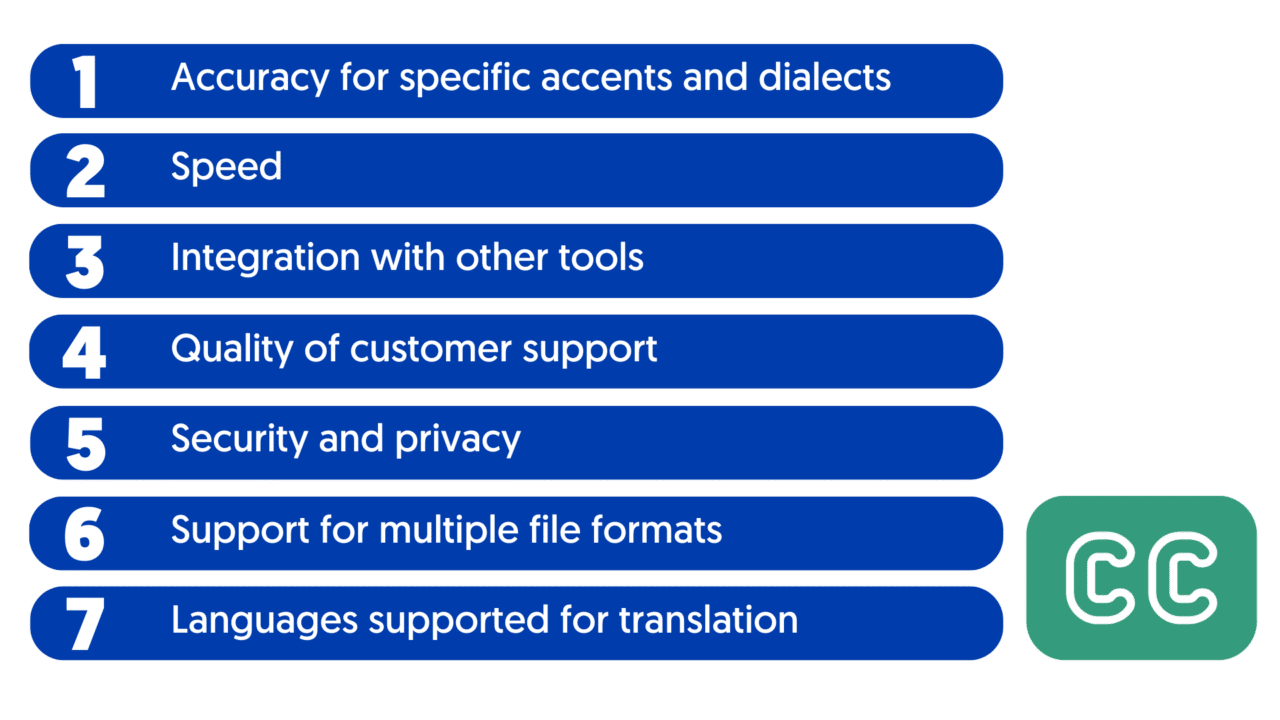
Accuracy for specific accents and dialects
One of the most significant elements to consider when selecting an automatic subtitling technology is its precision in capturing specific accents and dialects. Accuracy is especially crucial for content creators who are targeting a specific audience with a certain accent or dialect.
It is critical to remember that not all automatic subtitling solutions are made equal in terms of accuracy. Some tools are better suited for transcribing certain accents and dialects than others. A subtitling tool that performs well for American English, for example, may not be as accurate when transcribing British English.
It is essential that you test your automatic subtitling technology with a sample of your content to confirm that it is accurate for your intended audience. Testing will show you how successfully the tool can transcribe the accents and dialects in your material. Claim your free trial and test Ammberscript’s subtitling quality here.
Another way to ensure accuracy is to choose a tool that has been specifically designed for the accent or dialect you are targeting. Many automatic subtitling tools now offer options for different accents and dialects, so it is important to choose a tool that offers the option that best suits your needs. For exmaple, Amberscript has languages experts from more than 39 different countries and also covers specific accents, such as all English accents or the Swiss German dialect.
Choosing an automatic subtitling technology that can effectively transcribe the accents and dialects used in your video is critical to ensuring that your audience completely understands and enjoys your material.
Speed
Another important factor to consider when choosing an automatic subtitling tool is its speed. The tool’s speed might have a significant impact on your productivity, especially if you produce a huge amount of information.
Various automatic subtitling software are faster than others, however, keep in mind that speed is also affected by the length and intricacy of your content. For example, a tool may be fast at transcribing simple sentences but may struggle with more complex sentences.
It is recommended that you test your automatic subtitling tool with a sample of your content to check that it is fast enough for your purposes. Testing will show you how long the tool takes to transcribe your text and whether or not it fulfills your speed criteria.
Another way to speed up the subtitling process is to choose a tool that offers features such as automatic timecode generation and synchronization with your video editing software. By decreasing the need for manual modifications, these capabilities can save you time and improve your workflow.
It is important to choose an automatic subtitling tool that can transcribe your content quickly and accurately. By considering the speed and accuracy of the tool, you can ensure that your workflow is efficient and your audience can fully enjoy your content. Just want to choose a system that you can trust – Amberscript is one of the best choices you can make. But you can find a comparison of the best subtitling tools here.
Integration with other tools
One important factor to consider when choosing an automatic subtitling tool is whether it can integrate seamlessly with other tools or platforms that you use to create and distribute your content. For instance, if you are using video editing software or hosting platforms, you want to make sure that the automatic subtitle service can work seamlessly with these tools.
When evaluating different services, check to see if they offer integrations with other popular tools and platforms. Some services may allow you to upload your videos directly to video hosting platforms like YouTube or Vimeo with subtitles already added.
Quality of customer support
No matter how easy to use an automatic subtitling tool may be, there may come a time when you need help or run into issues. Look for services that offer responsive and helpful customer support.
Some automatic subtitling tools offer customer support through various channels, such as email, phone, or live chat. Before selecting a tool, consider the availability of customer support and the responsiveness of the service.
Furthermore, some automatic subtitling solutions include resources such as tutorials, user guides, as well as frequently asked questions (FAQs) to help you resolve problems on your own. When you need rapid solutions to difficulties, these sites might be extremely useful.
Security and privacy
If you’re working with sensitive content, it’s crucial to evaluate the security and privacy features of any automatic subtitling tool you’re considering. Look for services that prioritize data protection and offer strong encryption to safeguard your content.
When evaluating different services, check to see what data protection measures they have in place. Security can include encryption of your video files and subtitles, as well as measures to prevent unauthorized access or data breaches. Some services may also have data privacy rules that adhere to industry norms and regulations.
By taking these aspects into account when selecting an automatic subtitling tool, you can guarantee that you choose a service that suits your demands while also providing the quality and assistance you require.
Support for multiple file formats
When choosing an automatic subtitling tool, it’s important to consider whether the service can generate subtitles in the file format you need. Given the type of content you’re making, subtitles in various file formats may be required to ensure compatibility with various systems and devices.
For example, some platforms may require subtitles in the SRT format, while others may require the WebVTT format. Some video editing software may require subtitles in specific file formats that are compatible with the software.
Therefore, it’s crucial to check if the automatic subtitling tool you’re considering supports the file formats you need. To ensure optimum adaptability and versatility, look for services that support a wide range of file types.
Remember, choosing an automatic subtitling tool with limited support for file formats may result in time-consuming conversions and additional work. Consequently, always confirm that the subtitling tool you select supports the file types required for the task at hand.
Languages supported for translation
If you need to translate your subtitles into multiple languages, it’s crucial to evaluate the language support offered by the automatic subtitling tool. Some tools may offer more extensive language support than others.
Before selecting a tool, review the languages supported for translation to ensure that it meets your needs. Some automatic subtitling tools offer translation support for a wide range of languages, while others may only support a few.
It’s also worth noting that translation quality varies based on the tool and language.
Some subtitling tools may produce more precise translations than others, so make careful to examine the translation’s accuracy before making your decision.
An overview of the best subtitle tools for your needs
| Software | Price | Accuracy | Security | Speed | Ease of use |
|---|---|---|---|---|---|
| Amberscript | From $8/hour (AI), Get a quote for manual services. | Up to 99% | High | Fast (AI), Varies (human) | Easy to use |
| Pictory AI | Free tier, paid plans start at $12/mo | Up to 95% | Moderate | Fast (AI) | Easy to use |
| Rev | $0.25/min (AI), From $1.50/min (human) | Up to 99% | High | Fast (AI), Varies (human) | Easy to use |
| 3Play Media | Pricing upon request | Up to 99% | High | Varies | Moderate |
| CaptioningStar | Starts at $1.50/minute | Up to 99% | High | Varies | Easy to use |
| Aegisub | Free | Depends on user | Depends on user’s system | Depends on user | Advanced, steeper learning curve |
| Otter.ai | Free tier, paid plans start at $10/mo | Up to 90% | Moderate | Fast (AI) | Easy to use |
| Subtitle Edit | Free | Depends on user | Depends on user’s system | Depends on user | Moderate |
| CaptionHub | Pricing upon request | Varies | High | Varies | Easy to use |
Common misconceptions about automatic subtitling
There are several misconceptions about automatic subtitling that prevent many content creators from utilizing this technology.
One common misconception is that automatic subtitling is always inaccurate. While there may be faults in automatic transcription, the technology has advanced significantly in recent years. Many automatic subtitling tools use advanced algorithms and machine learning to improve accuracy.
Another misconception is that automatic subtitling is only useful for certain types of content. Automatic subtitling, on the other hand, can be useful for a variety of content, including instructional videos and even social media material.
In fact, studies have shown that incorporating subtitles into video content can improve engagement and retention rates. According to a study by Facebook, videos with subtitles are watched 12% longer than those without.
Amberscript as the choice #1
When it comes to selecting a high-quality automatic subtitling tool, Amberscript is a top choice. Amberscript offers support for multiple file formats (e.g. SRT, VTT, EBU-STL and more), a wide range of languages for translation (+39), and seamless integration with other tools and platforms. Their customer support is also highly responsive and helpful.
Amberscript works by using advanced speech recognition technology to transcribe audio into text. The tool also offers a user-friendly editor that allows users to review and edit the subtitles before exporting them in their desired file format.
In addition to automatic subtitling, Amberscript also offers other services, including manual transcription, translation, and captioning.
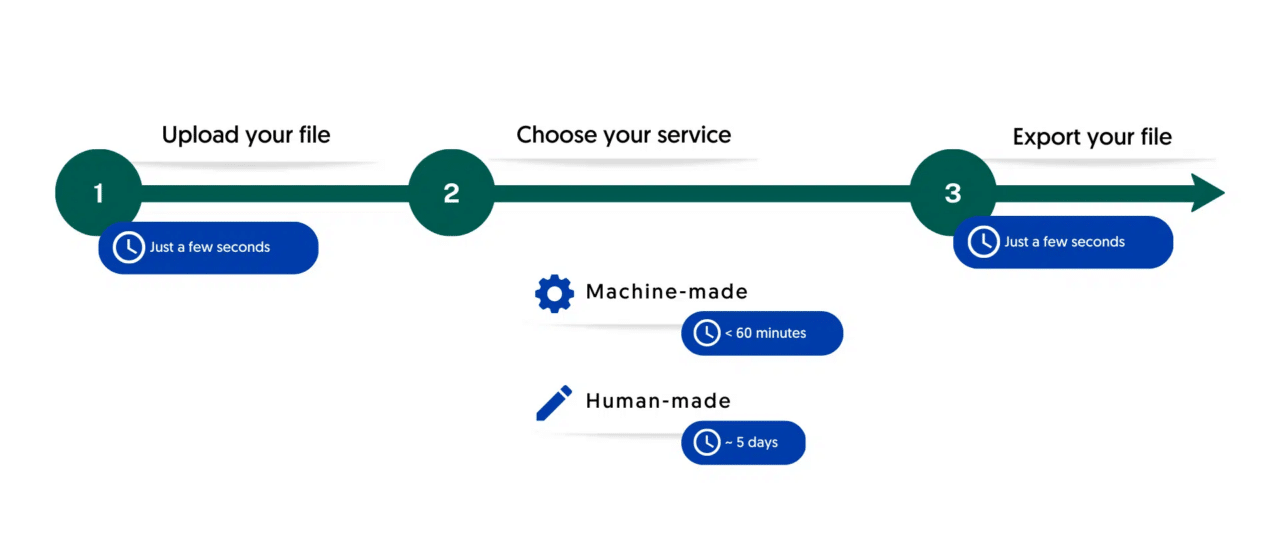
Creating subtitles with Amberscript in 3 simple steps
Benefits of using Amberscript
Amberscript’s subtitling services are:

Fast
Edit your text in minutes or leave the work to our experienced subtitlers.

Accurate
Our experienced subtitlers and thorough quality controls ensure 100% accuracy of transcripts and subtitles.

Easy
Through a series of integrations and API interfaces, you can fully automate your workflows.

Secure
Your data is in safe hands. We are GDPR compliant + ISO27001 and ISO9001 certified.
Enhancing accessibility and engagement: The power of automatic subtitling with Amberscript
In conclusion, automatic subtitling is a valuable tool for content creators looking to improve accessibility and engagement for their audiences. When choosing an automatic subtitling program, consider elements like file format support, language translation, integration with other products, and customer assistance quality.
Amberscript is a top choice for a high-quality automatic subtitling tool that meets all of these criteria. Amberscript offers a comprehensive solution for automatic subtitling needs. These services include advanced speech recognition technology, a user-friendly editor, and additional services such as manual transcription and translation.
By choosing a high-quality automatic subtitling tool like Amberscript, content creators can ensure that their subtitles are accurate, accessible, and engaging for their audiences.
Frequently asked questions
-
Can I burn the subtitles directly onto my video?
If you have exported the transcript as a SRT, EBU-STL or VTT file, you can easily burn them onto your video using video-editing software.
-
Can I export my files with timestamps?
Yes, you can. The transcript always includes timestamps in our online editor and you can choose to export the file with or without timestamps.
-
Do you add timestamps?
Yes, timestamps are included in the transcript.You can choose to export the transcript with or without timestamps.
-
Do you offer services in other languages?
For our human-made subtitling services we work with a network of language experts in 15 different languages. Find out which here. If the language you want is not on the list, please contact us through our contact form.
-
How do I add captions to a video on Vimeo?
To add captions to your Vimeo video, simply add the file you have created using Amberscript to your video in the editing window on Vimeo. Click on “distribution”, then “subtitles” and finally click on the + symbol to upload the SRT file.
-
How do I add captions to a Youtube video?
To add captions to your Youtube video, simply add the file you have created using Amberscript to your video in the Youtube Studio. Click on “subtitles”, then “add” and finally “upload file” and select the SRT file.
-
How do I export my subtitles?
Once your file is ready and available in your account, you can simply click on the file name and then select the “export file” button at the top left of the page. You can then select the file format, style of sutitles (between BBC and Netflix) and alignment. Please note that you can only export a file if you have validated your email address when creating an account.
-
How do you keep my files secure and confidential?
Amberscript’s IT infrastructure is built on the server infrastructure of Amazon Web Services located in Frankfurt, Germany. All data that is processed by Amberscript will be stored and processed on highly secured servers with regular back-ups on the same infrastructure.
-
To which languages can you translate subtitles?
For our human-made subtitling services we work with a network of language experts in 15 different languages. Find out which here. If the language you want is not on the list, please contact us through our contact form.
-
What is the turnaround time?
The standard deliver time is up to 5 business days. You will also have the option to ask for a rush order. We will then prioritize your file and deliver up to 4 times as fast.
-
Will different speakers be distinguished?
Yes, our software indicates different speakers and when the speaker changes.
-
What subtitle file formats are supported?
Our software allows you to export the transcript from the video or audio file as an SRT, EBU-STL or VTT file.
How to Add Captions and Subtitles to Kaltura Videos?
Adding captions to videos has become increasingly essential to producing well-received and well-rounded content. The benefits of subtitles are extensive, and this guide will highlight how to add subtitles to Kaltura videos via Amberscript and how important it is to include subtitles in general.
What is Kaltura?
Kaltura is a SaaS (Software as a Service) platform that focuses on providing a vast video platform as a service and other SaaS products. Kaltura is an incredibly effective tool for creating and uploading video content. Kaltura is an application available for various platforms allowing users to upload and stream everything from screen recordings to large video files.
Kaltura can play and interpret various file types in different browsers, ensuring that many users can access the media. Kaltura is secure, dependable, and versatile, which makes it an excellent option for storing and sharing videos.
What are Subtitles?
Introduced in the 1930s, subtitles came about when silent films transitioned to films featuring spoken audio. The purpose of subtitles was to accommodate foreign audiences who did not speak the language of the film, and they ended up acting as much more than that.
Today, the immediate purpose behind subtitles, regardless of the video content, is to translate any spoken audio into a language the video viewer can understand. In many cases, captions can open up the world of video content to new audiences, bringing about inclusivity and the ability to share your content with millions.

What are the benefits of adding subtitles to Kaltura videos?
Subtitles or closed captions offer plenty of benefits regardless of the video platform you use. Amberscript makes it easy for you to add subtitles to your Kaltura videos, so we’ll stress the benefits of including subtitles in every Kaltura video you create.
Reach a local audience
Captions can help you reach your local audience by maximizing your promotional and marketing outreach. It will ensure that the message of your videos comes across clearly to your demographic. Subtitles can provide your views with clarity when it comes to full names, technical terms, and brand names.
When your subtitles mention your location and company’s name, you increase your chances of connecting with your local audience. Remember, regardless of the location of your target audience, videos with subtitles accumulate more views than those without subtitles.
Help the Deaf and Hard of Hearing communities
Those who are deaf or hard of hearing cannot engage with video content that doesn’t contain subtitles. Eliminating an entire demographic just because you’ve failed to include subtitles is a disastrous (yet extremely fixable) business error.
Whether you’re uploading online course information or sharing vital business knowledge via social media, it’s crucial to include subtitles consistently. It’s also important to consider the many people that scroll through Instagram and Facebook reels without the sound on their phones. They also want access to captions, as they want the content, not the sound.
Subtitles allow business owners to be inclusive. Closed captions, subtitles, and transcripts are no longer about thinking outside the box. Instead, they’re a necessity.
Bigger SEO reach
Unless you’ve been living under a rock, you probably have a good idea about search engine optimization (SEO) and how to make it work for your business. However, many business owners and marketing teams overlook how captions and subtitles can work in favor of SEO.
Adding subtitles can make your videos readable by Google, and other search engines, which means utilizing your target keywords (and your brand name) within your video content can increase the frequency in which your video pops up in user searches. Adding captions or transcripts can boost your on-page ranking and possibly earn you backlinks to your video, primarily if it’s full of practical, relevant, rich information.
However, to reap these benefits, it’s crucial to add subtitles to your video correctly. We can help you do this with your Kaltura content.
Additional benefits
There are many perks to using Amberscript to add subtitles or captions to your Kaltura video uploads. Not only are you making things easier on those who cannot hear or speak English (for example) as a second language, but you’ll also notice the following benefits:
- Users can watch your content in a sound-sensitive environment;
- Videos with subtitles aid in more extended user engagement;
- Subtitles and closed captions provide clarity to your content.
The steps of adding closed captions to a Kaltura video with Amberscript
Before using Amberscript in conjunction with Kaltura, it’s essential to understand the steps of the process. Amberscript makes it simple to add closed captions to your videos, making them more accessible to a broader audience. Here’s how you do it!
1. Upload video
You’ll start by uploading your video to the Kaltura platform. If you don’t have access to Amberscript, you can gain it through Kaltura and their REACH program. Once you’ve completed the process, ensuring that you’ve uploaded your video in its entirety, you can move on to the next step.
2. Choose language and services
Now that you’ve got your video on the Kaltura platform, you can use the Amberscript application to choose the language and services you’d like to feature in your video closed captions. Amberscript has made it incredibly simple to decide how you want to display your subtitles to your audience.
3. Receive file
You can click receive file when you’re ready to accept your subtitled Kaltura video. You may have to make manual adjustments to your subtitles, such as correcting spelling errors or choosing the font you want to display.
Amberscript allows users to select the color of the font and font shadow, if necessary. How you want your subtitles to look will depend heavily on the content and colors in your video. If your received file isn’t exactly as you envisioned, you can restart the process easily and quickly. As always, the Amberscript team is available to help!

Transform your audio and
video to text and subtitles
- High accurate, on demand service
- Competitive pricing with the fastest turnaround using AI
- Upload, search edit and export subtitles with ease.
Accessing the Amberscript API for large volumes of content
Amberscript offers an API for our users with large content volumes requiring subtitles, captioning, or transcription. Suppose your company is using Kaltura to create and share video content. In that case, you can work with Amberscript for API access and the ability to upload a large amount of content which will automatically go to Amberscript for captioning.
We find this option works best for substantial companies that regularly upload a great deal of content. However, if you think our API will work well for your company, please get in touch with us for more information. We’ll be happy to provide you with more knowledge regarding our integration with Kaltura.
About Amberscript
Amberscript aims to transform your video content by adding automatic subtitles and captioning to help you reach a wider audience. Our platform allows you to easily upload, search, edit, and export your content. Through the use of artificial intelligence, we can offer you the fastest turnaround on subtitles with incredibly competitive pricing!
Our closed caption service boasts high accuracy. We’re on-demand, so you can be confident that our service will be there whenever you need it, regardless of your time or location. Amberscript allows our users to create better subtitles in a shorter period of time, making audio accessible to everyone.
All you have to do to take advantage of our revolutionary platform is sign up, upload, and get to work! You can manually edit your subtitles if you wish or automate them through a platform like Kaltura. Our language experts and professional subtitlers are there to help you every step of the way, ensuring the best outcome possible for your freshly captioned content.
The two million users and organizations who swear by our platform can’t be wrong! If you’re ready to begin captioning your videos, reaching more people, and showing up more frequently in user searches, you can start your journey with Amberscript today.