

Trascrizioni
Automatically generate subtitles
Autogenerate subtitles in Italian
Easily get Italian subtitles using our Automatic Speech Recognition (ASR) software. Italian it’s the mother tongue of over 80 million people worldwide. Although there are various dialects, the main version is the Tuscan dialect.The Amberscript ASR can detect many Italian dialects and colloquialisms.
Loved by over a million customers
4.3 on Trustpilot

4.5 on Google


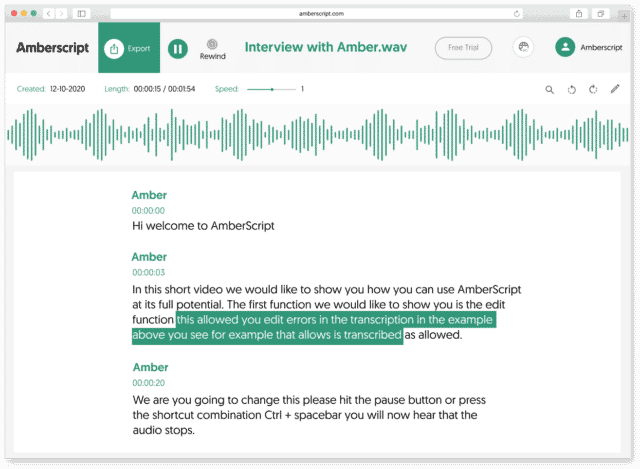
How to automatically generate Italian subtitles:
1. Upload your video in ItalianUpload your video. Select the number of speakers and the audio language. Sit back and relax while AI generates the subtitles.
2. Edit your subtitle fileYou’ll receive your subtitle text. Easily make any changes in our cloud-based editor.
3. Export in multiple formatsWhatever formats you need, we’ve got you covered. docx., .txt, .srt, .json, .vtt, or EBU.STL
Check out our
Trustpilot reviews
Eccellente
 Basato su 376 recensioni


Le prime impressioni non sono sempre ingannevoli
Un app fantastica, mi ha risparmiato tantissime ore di transcrizione …
Gurge Piloyan
Trascrizione perfetta e servizio ottimo
Ho ricevuto una trascrizione perfetta e di alta qualità!
Andres
Esperienza fantastica
Ho dato un’occhiata ad altri siti, ma non sono riuscita …
Gabriela Valiente
La mia opinione onesta
La mia opinione onesta su Amberscript basata sulle ultime settimane é …
Daniel Pott

Il servizio è veloce e buono per essere
Il servizio è veloce e buono per essere una trascrizione automatica …
Frequently Asked Questions
-
Come posso generare sottotitoli CC?
Puoi creare sottotitoli automaticamente utilizzando Amberscript. Il nostro software ti permette di convertire il tuo file audio in testo ed esportarlo nei formati SRT, EBU-STL o VTT, che sono facilmente inseribili in un video-editor. Ne vuoi sapere di più? Eccouna guida step-by-step su come creare e aggiungere i tuoi sottotitoli.
-
Come aggiungo i sottotitoli ad un video di YouTube?
Per aggiungere i sottotitoli ad un video di YouTube devi semplicemente aggiungere al tuo video il file che hai creato utilizzando Amberscript, nel YouTube Studio. Clicca su “sottotitoli”, poi “aggiungi” e infine “carica un file” e seleziona file SRT.
-
Offrite i servizi in altre lingue?
Sì. Sì. Il nostro software supporta 39 lingue e il nostro network di professionisti madrelingua traduce i sottotitoli in 15 lingue attraverso i servizi di sottotitoli professionali. Puoi richiedere sottotitoli tradotti durante il caricamento del file. Contattaci per richiedere una lingua che non è presente nella nostra lista.
-
Posso incorporare direttamente i sottotitoli nel video?
Se hai esportato la trascrizione in formato SRT, EBU-STL o VTT, puoi facilmente incorporarli utilizzando un software di video editing.
-
Come posso ordinare sottotitoli tradotti?
Carica normalmente il tuo file. Poi seleziona ‘sottotitoli professionali’ per scegliere la lingua in cui tradurre i tuoi sottotitoli. Se non trovi la lingua che cerchi, contattaci attraverso il nostro form.
-
Aggiungete i segnatempo?
Sì, i segnatempo sono inclusi nella trascrizione. Puoi scegliere se esportare la trascrizione con o senza segnatempo.
Why use ASR to create Italian subtitles?
ASR or “automated speech recognition” is a technology that takes in human speech and converts it into text. Although it’s been around since the early 1950s, it’s made massive strides in accuracy and speed thanks to advances in the techniques. If you’ve ever tried transcribing words yourself, then you know it can be tedious and time-consuming.
However, ASR can do it much faster and makes it easier to apply subtitles and closed captions to videos, documentaries, TV shows, and more. There are many benefits that come along with combining the two.
– It makes your videos more accessible: If someone has difficulty hearing or is deaf, subtitles and CC helps them enjoy and comprehend what’s being said without actually needing to listen.
–It makes things clear for the viewer: Let’s face it– sometimes words get lost or are spoken too fast to catch. Subtitles and CC make things clear for the viewer.
– It helps with learning the language: If you’re new to a language like Italian, having the subtitles makes it easier to parse out each individual word.
– It assists in converting to other languages: Subtitles and CC in the native language can be translated seamlessly to another language.