Automatically generate subtitles
Autogenerate subtitles in French
Easily get French subtitles using our Automatic Speech Recognition (ASR) software. French is spoken by approximately 220 million people globally and is an official language in 29 countries, including France, Canada, Belgium, Ivory Coast, and Mali. The ASR can detect many French dialects and colloquialisms.
4.3 on Trustpilot

4.5 on Google


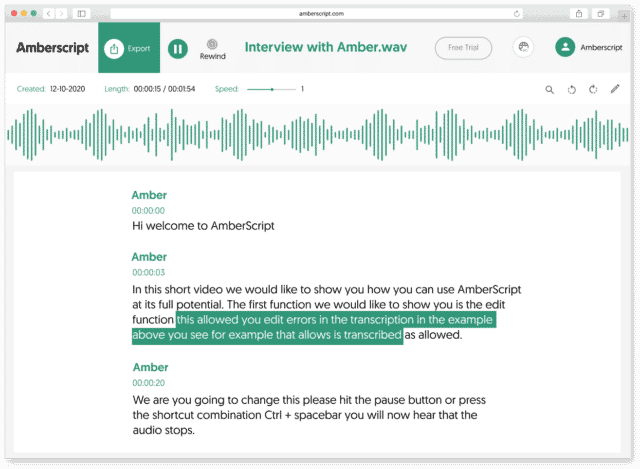
How to automatically generate French subtitles:
1. Upload your video in French. Upload your video. Select the number of speakers and the audio language. Sit back and relax while AI generates the subtitles.
2. Edit your subtitle file. You’ll receive your subtitle text. Easily make any changes in our cloud-based editor.
3. Export in multiple formats. Whatever formats you need, we’ve got you covered. docx., .txt, .srt, .json, .vtt, or EBU.STL
Check out our
Trustpilot reviews
Uitstekend
 Gebaseerd op 376 reviews


Aantal maal Amberscript gebruikt en…
Topkwaliteit!
Amberscript is de scriptiehulp app!
Werkt fantastisch
Heel erg tevreden
Frequently Asked Questions
-
Bieden jullie diensten aan in andere talen?
Ja, we kunnen ook andere talen aanbieden Onze software ondersteunt 39+ verschillende talen en we kunnen via ons netwerk van experts in 15+ verschillende talen vertaalde ondertiteling leveren via onze professionele ondertiteling service. Vertaalde ondertitels kunnen ook worden aangevraagd tijdens het upload process. Als u een taal wilt aanvragen die niet in onze lijst staat, neem dan contact met ons op.
-
Voegen jullie tijdstempels toe?
Ja, de tijdstempels zijn opgenomen in het transcript. Je kan kiezen om het transcript te exporteren met of zonder tijdstempels.
-
Hoe voeg ik ondertiteling toe aan een Youtube-video?
Om ondertiteling toe te voegen aan een Youtube-video, voeg je eenvoudigweg het bestand dat je met Amberscript hebt gemaakt toe aan de video in de Youtube Studio. Klik op ” ondertiteling “, dan “toevoegen” en tenslotte “bestand uploaden” en selecteer het SRT-bestand.
-
Kan ik de ondertiteling direct op mijn video branden?
Als je het transcript als een SRT-, EBU-STL- of VTT-bestand hebt geëxporteerd, kun je ze gemakkelijk op je video branden met behulp van video-editing software.
-
Hoe maak ik captions?
Je kan automatisch captions genereren met behulp van Amberscript. Met onze software kan je transcripties exporteren op basis van audio-/videobestanden zoals SRT, EBU-STL of VTT-bestanden, die eenvoudig in een video-editor kunnen worden ingevoegd. Wil je meer weten? Hier vind je een stap-voor-stap handleiding.
-
Hoe bestel ik vertaalde ondertiteling?
Om vertaalde ondertiteling te bestellen, kan je je bestand zoals gewoonlijk uploaden. Je kunt dan kiezen voor de optie professionele ondertiteling. Zodra je deze hebt geselecteerd, is er een optie om een taal te selecteren waarnaar de ondertitels vertaald moeten worden. Als de taal waarnaar je wilt vertalen er niet tussen staat, kan je contact met ons opnemen via ons contact formulier.
Why choose automatic recognition subtitles for French subtitles?
French is one of the most influential languages on the planet. It is spoken across all continents and holds importance in many diplomatic settings. So it makes sense that there is a thirst for French subtitles around the world.
Firstly, French remains one of the most widely chosen second languages to learn, and research shows that watching videos with subtitles in the target language can help accelerate language learning.
Secondly, French subtitles will allow you to reach a wider audience around the world whose first language may not be English.
And by supplying subtitles in target languages, those that are hard of hearing, or in noisy spaces and cannot listen, will still be able to access your content. And accessibility is one of the KPI’s in audience retention.
Transcription is time-consuming, though. That’s why we use AI technology to automatically detect speech and create subtitles that are easily editable before you export them.