Automatically generate subtitles
Autogenerate subtitles in Farsi
Easily get Farsi subtitles using our Automatic Speech Recognition (ASR) software. As the national language of Iran, Afghanistan, and Tajikistan, Farsi is also called Persian, Dari, or Tajiki. Approximately 60 to 80 million people speak the Farsi language natively around the world. The Farsi language is one of the oldest languages still used and spoken widely globally. Our ASR can detect the Iranian Farsi dialect and colloquialisms.
4.3 on Trustpilot

4.5 on Google


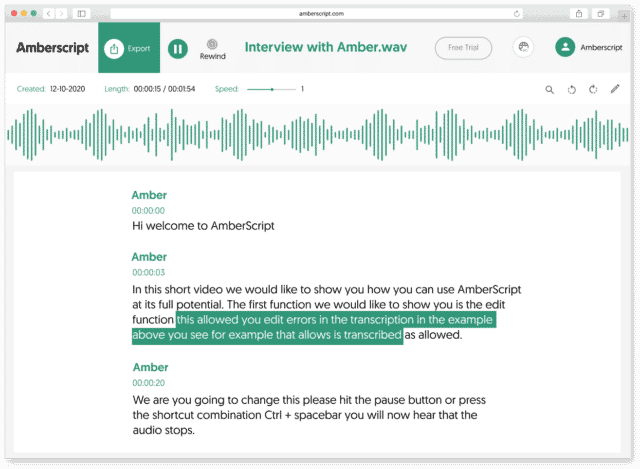
How to automatically generate Farsi subtitles:
1. Upload your video in Farsi Upload your video. Select the number of speakers and the audio language. Sit back and relax while AI generates the subtitles.
2. Edit your subtitle file You’ll receive your subtitle text. Easily make any changes in our cloud-based editor.
3. Export in multiple formats Whatever formats you need, we’ve got you covered. docx., .txt, .srt, .json, .vtt, or EBU.STL
Check out our
Trustpilot reviews
Uitstekend
 Gebaseerd op 376 reviews


Aantal maal Amberscript gebruikt en…
Topkwaliteit!
Amberscript is de scriptiehulp app!
Werkt fantastisch
Heel erg tevreden
Frequently Asked Questions
-
Bieden jullie diensten aan in andere talen?
Ja, we kunnen ook andere talen aanbieden Onze software ondersteunt 39+ verschillende talen en we kunnen via ons netwerk van experts in 15+ verschillende talen vertaalde ondertiteling leveren via onze professionele ondertiteling service. Vertaalde ondertitels kunnen ook worden aangevraagd tijdens het upload process. Als u een taal wilt aanvragen die niet in onze lijst staat, neem dan contact met ons op.
-
Voegen jullie tijdstempels toe?
Ja, de tijdstempels zijn opgenomen in het transcript. Je kan kiezen om het transcript te exporteren met of zonder tijdstempels.
-
Hoe voeg ik ondertiteling toe aan een Youtube-video?
Om ondertiteling toe te voegen aan een Youtube-video, voeg je eenvoudigweg het bestand dat je met Amberscript hebt gemaakt toe aan de video in de Youtube Studio. Klik op ” ondertiteling “, dan “toevoegen” en tenslotte “bestand uploaden” en selecteer het SRT-bestand.
-
Kan ik de ondertiteling direct op mijn video branden?
Als je het transcript als een SRT-, EBU-STL- of VTT-bestand hebt geëxporteerd, kun je ze gemakkelijk op je video branden met behulp van video-editing software.
-
Hoe maak ik captions?
Je kan automatisch captions genereren met behulp van Amberscript. Met onze software kan je transcripties exporteren op basis van audio-/videobestanden zoals SRT, EBU-STL of VTT-bestanden, die eenvoudig in een video-editor kunnen worden ingevoegd. Wil je meer weten? Hier vind je een stap-voor-stap handleiding.
-
Hoe bestel ik vertaalde ondertiteling?
Om vertaalde ondertiteling te bestellen, kan je je bestand zoals gewoonlijk uploaden. Je kunt dan kiezen voor de optie professionele ondertiteling. Zodra je deze hebt geselecteerd, is er een optie om een taal te selecteren waarnaar de ondertitels vertaald moeten worden. Als de taal waarnaar je wilt vertalen er niet tussen staat, kan je contact met ons opnemen via ons contact formulier.
Why Use ASR to Create Subtitles?
With automatic speech recognition, subtitles can be created more easily than listening to audio and transcribing the captions yourself. By automating the process, you’ll save hours of manual time and effort. When you upload your video file to Amberscript, our ASR scans the audio and transforms it into text using machine learning and language models. When complete, you can use use our online editor to edit the subtitles, highlight sections, find specific text, and ensure that it’s synched to the files audio correctly. You can then export the subtitle file directly or burn them straight onto your video file permanently.
By subtitling your video content, you will be making it easier for those who are deaf or hard of hearing to engage with your content. You will also provide a way for people who may be watching in places where they need to be discreet with noise, such as in offices, libraries, or on public transportation.