Automatically generate subtitles
Autogenerate subtitles in Portuguese
Easily get Portuguese subtitles using our Automatic Speech Recognition (ASR) software. Poruguese is the official language of Portugal. However, only around 5% of people who speak the language actually reside in Portugal. It’s also spoken across many other African and Asian countries such as Brazil, Mozambique, Cape Verde, São Tomé, Macau, and many more. It’s estimated that roughly 300 million people are native speakers of Portuguese, making it the 6th most spoken language globally. The ASR can detect many Portuguese dialects and colloquialisms.
4.3 on Trustpilot

4.5 on Google


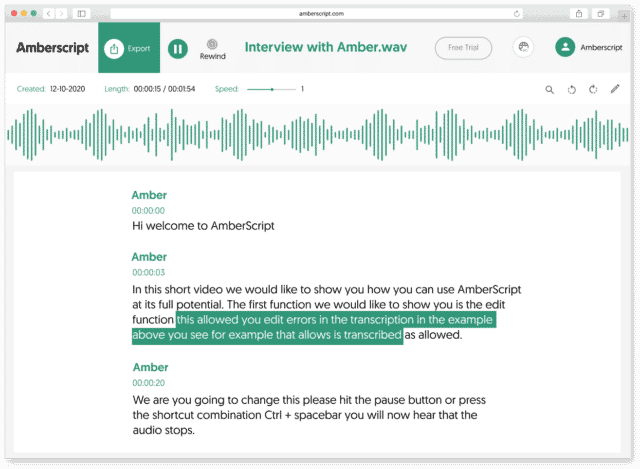
How to automatically generate Portuguese subtitles:
1. Upload your video in PortugueseUpload your video. Select the number of speakers and the audio language. Sit back and relax while AI generates the subtitles.
2. Edit your subtitle fileYou’ll receive your subtitle text. Easily make any changes in our cloud-based editor.
3. Export in multiple formatsWhatever formats you need, we’ve got you covered. docx., .txt, .srt, .json, .vtt, or EBU.STL
Check out our
Trustpilot reviews
Excellent
 Basé sur 376 commentaires


Très bonne expérience générale.
Super application qui m’a fait gagner…
Gain de temps et efficacité
Transcription en français
Rapide et efficace
Frequently Asked Questions
-
Comment générer des ous-titres codés ?
Vous pouvez générer automatiquement des sous-titres codés à l’aide d’Amberscript. Notre logiciel vous permet d’exporter la transcription basée sur des fichiers audio / vidéo sous forme de fichiers SRT, EBU-STL ou VTT, qui peuvent facilement être insérés dans un éditeur vidéo. Voulez-vous en savoir plus ? Voici un guide étape par étape.
-
Comment ajouter des sous-titres à une vidéo YouTube ?
Pour ajouter des sous-titres à votre vidéo YouTube, ajoutez simplement le fichier que vous avez créé avec Amberscript à votre vidéo dans Youtube Studio. Cliquez sur «sous-titres», puis sur «ajouter» et enfin sur «télécharger le fichier» et sélectionnez le fichier SRT.
-
Ajoutez-vous des horodatages ?
Oui, les horodatages sont inclus dans la transcription. Vous pouvez choisir d’exporter la transcription avec ou sans horodatage.
-
Offrez-vous vos services dans d’autres langues ?
Oui, nous le faisons. Notre logiciel prend en charge 39 langues différentes et nous pouvons fournir des sous-titres traduits via les services de sous-titrage manuel en utilisant notre réseau d’experts dans 15 langues différentes. Des sous-titres traduits peuvent être demandés lors du processus de téléchargement. Si vous voulez demander une langue qui ne figure pas sur notre liste, merci de nous contacter.
-
Puis-je graver les sous-titres directement sur ma vidéo ?
Si vous avez exporté la transcription sous forme de fichier SRT, EBU-STL ou VTT, vous pouvez facilement les graver sur votre vidéo à l’aide d’un logiciel de montage vidéo.
-
Comment commander des sous-titres traduits ?
Pour commander des sous-titres traduits, vous pouvez télécharger votre fichier comme vous le feriez habituellement. Sélectionnez ensuite les sous-titres manuels. Une fois que vous avez sélectionné cela, une option apparaîtra où vous pourrez sélectionner la langue dans laquelle les sous-titres ont besoins d’être traduits. Si la langue que vous désirez ne fait pas partie des options, vous pouvez nous contacter via notre formulaire de contact.
The Benefits of ASR, Subtitles, & Closed Captions (CC)
At Amberscript, we offer businesses and people the option to seamlessly add subtitles and closed captions to their projects, videos, films, and shows through the power of ASR. ASR is short for Automatic Speech Recognition, which is a technological solution for converting spoken language to text without the need of a human.
Subtitles and CC are a critical part of helping viewers understand and comprehend what’s going on the screen. While the standard use is to help those who are deaf or hearing impaired, making your videos more accessible, it’s also a fantastic tool for various other reasons.
With subtitles and CC, people get a clearer picture of what’s being said and that’s extremely helpful in more technical fields with precise jargon or assisting people with understanding someone’s name. Plus, it’s also beneficial to people looking to learn another language so they can follow along and see what’s being said and hear it spoken correctly. And if you’re an international company, converting your audio to text can assist with translation efforts to other languages. Overall, ASR is a powerful tool that brings words to life and makes adding subtitles & closed captions easier than ever.