Automatically generate subtitles
Autogenerate subtitles in French
Easily get French subtitles using our Automatic Speech Recognition (ASR) software. French is spoken by approximately 220 million people globally and is an official language in 29 countries, including France, Canada, Belgium, Ivory Coast, and Mali. The ASR can detect many French dialects and colloquialisms.
4.3 on Trustpilot

4.5 on Google


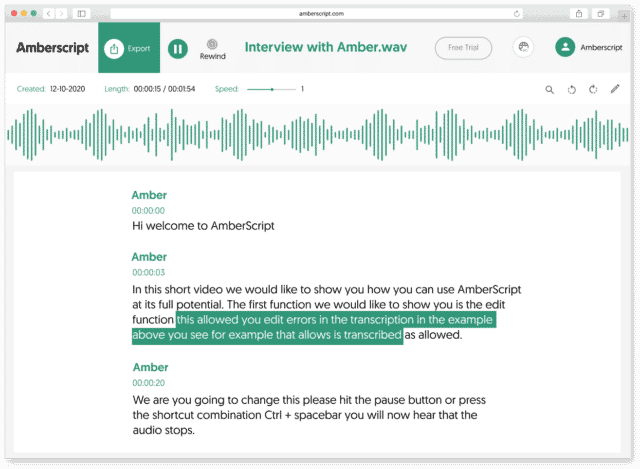
How to automatically generate French subtitles:
1. Upload your video in French. Upload your video. Select the number of speakers and the audio language. Sit back and relax while AI generates the subtitles.
2. Edit your subtitle file. You’ll receive your subtitle text. Easily make any changes in our cloud-based editor.
3. Export in multiple formats. Whatever formats you need, we’ve got you covered. docx., .txt, .srt, .json, .vtt, or EBU.STL
Check out our
Trustpilot reviews
Excellent
 Basé sur 376 commentaires


Très bonne expérience générale.
Super application qui m’a fait gagner…
Gain de temps et efficacité
Transcription en français
Rapide et efficace
Frequently Asked Questions
-
Comment générer des ous-titres codés ?
Vous pouvez générer automatiquement des sous-titres codés à l’aide d’Amberscript. Notre logiciel vous permet d’exporter la transcription basée sur des fichiers audio / vidéo sous forme de fichiers SRT, EBU-STL ou VTT, qui peuvent facilement être insérés dans un éditeur vidéo. Voulez-vous en savoir plus ? Voici un guide étape par étape.
-
Comment ajouter des sous-titres à une vidéo YouTube ?
Pour ajouter des sous-titres à votre vidéo YouTube, ajoutez simplement le fichier que vous avez créé avec Amberscript à votre vidéo dans Youtube Studio. Cliquez sur «sous-titres», puis sur «ajouter» et enfin sur «télécharger le fichier» et sélectionnez le fichier SRT.
-
Ajoutez-vous des horodatages ?
Oui, les horodatages sont inclus dans la transcription. Vous pouvez choisir d’exporter la transcription avec ou sans horodatage.
-
Offrez-vous vos services dans d’autres langues ?
Oui, nous le faisons. Notre logiciel prend en charge 39 langues différentes et nous pouvons fournir des sous-titres traduits via les services de sous-titrage manuel en utilisant notre réseau d’experts dans 15 langues différentes. Des sous-titres traduits peuvent être demandés lors du processus de téléchargement. Si vous voulez demander une langue qui ne figure pas sur notre liste, merci de nous contacter.
-
Puis-je graver les sous-titres directement sur ma vidéo ?
Si vous avez exporté la transcription sous forme de fichier SRT, EBU-STL ou VTT, vous pouvez facilement les graver sur votre vidéo à l’aide d’un logiciel de montage vidéo.
-
Comment commander des sous-titres traduits ?
Pour commander des sous-titres traduits, vous pouvez télécharger votre fichier comme vous le feriez habituellement. Sélectionnez ensuite les sous-titres manuels. Une fois que vous avez sélectionné cela, une option apparaîtra où vous pourrez sélectionner la langue dans laquelle les sous-titres ont besoins d’être traduits. Si la langue que vous désirez ne fait pas partie des options, vous pouvez nous contacter via notre formulaire de contact.
Why choose automatic recognition subtitles for French subtitles?
French is one of the most influential languages on the planet. It is spoken across all continents and holds importance in many diplomatic settings. So it makes sense that there is a thirst for French subtitles around the world.
Firstly, French remains one of the most widely chosen second languages to learn, and research shows that watching videos with subtitles in the target language can help accelerate language learning.
Secondly, French subtitles will allow you to reach a wider audience around the world whose first language may not be English.
And by supplying subtitles in target languages, those that are hard of hearing, or in noisy spaces and cannot listen, will still be able to access your content. And accessibility is one of the KPI’s in audience retention.
Transcription is time-consuming, though. That’s why we use AI technology to automatically detect speech and create subtitles that are easily editable before you export them.