Automatically generate subtitles
Autogenerate subtitles in German
Easily get German subtitles using our Automatic Speech Recognition (ASR) software. German is the 10th most spoken language in the world, with 100 million native speakers around the world. It’s estimated that there are 250 dialects that exist within the German language. The German language is the official language of Switzerland, Lichtenstein, Luxemburg, Belgium, Austria, as well as Germany itself. High German (Hochdeutsch, standard German) is known as the most commonly spoken German dialect, widely spoken in Germany’s central and southern highlands, Austria, and Switzerland.The ASR can detect many German dialects and colloquialisms.
4.3 on Trustpilot

4.5 on Google


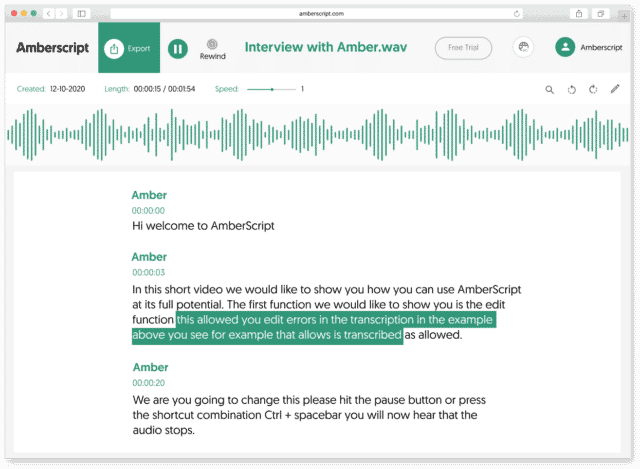
How to automatically generate German subtitles:
1. Upload your video in GermanUpload your video. Select the number of speakers and the audio language. Sit back and relax while AI generates the subtitles.
2. Edit your subtitle fileYou’ll receive your subtitle text. Easily make any changes in our cloud-based editor.
3. Export in multiple formatsWhatever formats you need, we’ve got you covered. docx., .txt, .srt, .json, .vtt, or EBU.STL
Check out our
Trustpilot reviews
Excelente
 Basado en 376 comentarios


Estoy encantada con Amberscript
Servicio transcripción perfecta
Fiel al texto oral
Jamás había pensado que podría ser tan…
Frequently Asked Questions
-
¿Cómo puedo generar subtítulos?
Puedes generar subtítulos automáticamente usando Amberscript. Nuestro software te permite exportar transcripciones basadas en archivos de audio / video como archivos SRT, EBU-STL o VTT, que podrás insertar fácilmente en un editor de video. ¿Quieres saber más? Aquí hay una guía paso a paso:
-
¿Puedo grabar los subtítulos directamente en mi video?
Si has exportado la transcripción como un archivo SRT, EBU-STL o VTT, puedes grabarlos fácilmente en tu video usando un software de edición de video.
-
¿Cómo añado subtítulos a un video de Youtube?
Para añadir subtítulos a tu video de Youtube, simplemente agrega el archivo que has creado usando Amberscript a tu video en Youtube Studio. Haz clic en «subtítulos», luego «agregar» y finalmente «cargar archivo» y selecciona el archivo SRT.
-
¿Añadís marcas de tiempo?
Sí, las marcas de tiempo están incluidas en la transcripción. Puedes elegir exportar la transcripción con o sin marcas de tiempo.
-
¿Ofrecéis servicios en otros idiomas?
Sí, lo hacemos. Nuestro software es compatible con 39 idiomas y podemos proporcionar subtítulos traducidos a través de los servicios de subtitulado manual utilizando nuestra red de expertos en 15 idiomas. Los subtítulos traducidos pueden solicitarse a través del proceso de carga. Si deseas solicitar un idioma que no forma parte de nuestra lista, ponte en contacto con nosotros.
-
¿Cómo solicito subtítulos traducidos?
Para pedir subtítulos traducidos, puedes subir tu archivo como lo harías normalmente. A continuación, podrás seleccionar la subtitulación manual. Una vez que hayas hecho la selección, aparecerá una opción en la que podrás elegir el idioma al que se deben traducir los subtítulos. Si el idioma que quieres no es una de las opciones, puedes ponerte en contacto con nosotros a través de nuestro formulario de contacto.
Using Automatic Speech Recognition (ASR) for generation German subtitles
Subtitling is made easier with automatic speech recognition. Subtitling can be automated, saving hours of time and effort. It is beneficial to add subtitles to digital content in order to ensure accessibility and increase engagement of your content.
With our subtitle generator, you can convert your audio file into subtitles automatically. Through our online text editor where you can easily edit the text, highlight sections, and find specific text. Subtitles can make it easier to understand fast-paced language or dialogue that has a foreign accent or is difficult to understand. The advantage of subtitles is that they can also assist in improving native language writing skills, including spelling, punctuation, and grammar. Additionally, subtitles or closed captioning enables your audience to watch videos where it’s difficult to hear, such as in offices, libraries, or on public transportation.