Automatically generate subtitles
Autogenerate subtitles in Portuguese
Easily get Portuguese subtitles using our Automatic Speech Recognition (ASR) software. Poruguese is the official language of Portugal. However, only around 5% of people who speak the language actually reside in Portugal. It’s also spoken across many other African and Asian countries such as Brazil, Mozambique, Cape Verde, São Tomé, Macau, and many more. It’s estimated that roughly 300 million people are native speakers of Portuguese, making it the 6th most spoken language globally. The ASR can detect many Portuguese dialects and colloquialisms.
4.3 on Trustpilot

4.5 on Google


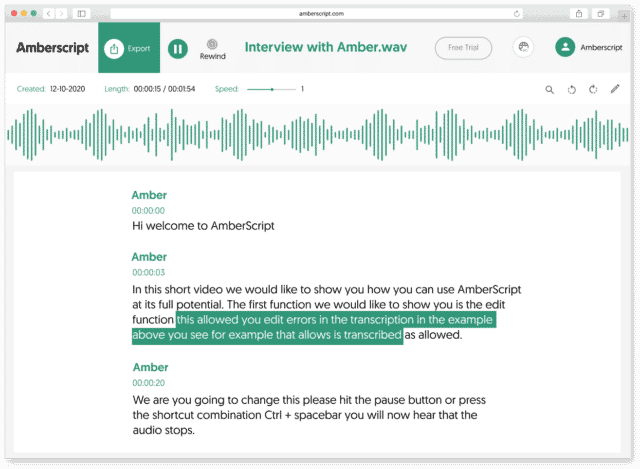
How to automatically generate Portuguese subtitles:
1. Upload your video in PortugueseUpload your video. Select the number of speakers and the audio language. Sit back and relax while AI generates the subtitles.
2. Edit your subtitle fileYou’ll receive your subtitle text. Easily make any changes in our cloud-based editor.
3. Export in multiple formatsWhatever formats you need, we’ve got you covered. docx., .txt, .srt, .json, .vtt, or EBU.STL
Check out our
Trustpilot reviews
Ausgezeichnet
 Basierend auf 376 Rezensionen


Absolut zufrieden
Super Kundenservice und sehr kulant
Ein super Tool
Gut und schnell
Amberscript ist ein gutes Tool um ein Interview zu verschriftlichen!
Frequently Asked Questions
-
Bieten Sie Dienstleistungen in anderen Sprachen an?
Ja, das tun wir. Unsere Transkriptionssoftware unterstützt 39 verschiedene Sprachen und wir haben die Möglichkeit, mittels unseres Expertennetzwerks übersetzte Untertitel durch manuelle Transkription in 15 verschiedenen Sprachen bereitzustellen. Um übersetzte Untertitel oder eine Sprache anzufordern, die nicht Teil unserer Liste ist, nutzen Sie bitte unser Kontaktformular oder wählen Sie die entsprechende Untertiteloption beim Upload-Prozess.
-
Sind Zeitstempel enthalten?
Ja, Zeitstempel sind im Transkript enthalten. Sie können das Transkript mit oder ohne Zeitstempel exportieren.
-
Kann ich die Untertitel direkt auf mein Video brennen?
Wenn Sie das Transkript als SRT-, EBU-STL- oder VTT-Datei exportiert haben, können Sie es mithilfe einer Videobearbeitungssoftware problemlos auf Ihr Video brennen.
-
Wie erstelle ich Untertitel?
Mit Amberscript können Sie Untertitel automatisch generieren lassen. Unsere Transkriptionssoftware gibt Ihnen die Möglichkeit, Ihre Videodatei zu verschriftlichen und die Transkripte anschließend als SRT, EBU-STL oder VTT zu exportieren, diese Formate können problemlos in einem Video-Editor verwendet werden. Möchten Sie mehr darüber erfahren? Hier finden Sie eine Schritt-für-Schritt-Anleitung.
-
Wie bestelle ich übersetzte Untertitel?
Um übersetzte Untertitel anzufordern, können Sie Ihre Datei wie üblich hochladen, danach den Service „Untertitel“, und die Option „Manuell“auswählen. Daraufhin können Sie die Zielsprache(n) festlegen. Wenn die von Ihnen gewünschte Sprache nicht auf der Liste zu finden ist, kontaktieren Sie uns bitte per Kontaktformular.
-
How do I add subtitles to a YouTube video?
To add subtitles to your Youtube video, simply add the file you have created using Amberscript to your video in the Youtube Studio. Click on „subtitles“, then „add“ and finally „upload file“ and select the SRT file.
The Benefits of ASR, Subtitles, & Closed Captions (CC)
At Amberscript, we offer businesses and people the option to seamlessly add subtitles and closed captions to their projects, videos, films, and shows through the power of ASR. ASR is short for Automatic Speech Recognition, which is a technological solution for converting spoken language to text without the need of a human.
Subtitles and CC are a critical part of helping viewers understand and comprehend what’s going on the screen. While the standard use is to help those who are deaf or hearing impaired, making your videos more accessible, it’s also a fantastic tool for various other reasons.
With subtitles and CC, people get a clearer picture of what’s being said and that’s extremely helpful in more technical fields with precise jargon or assisting people with understanding someone’s name. Plus, it’s also beneficial to people looking to learn another language so they can follow along and see what’s being said and hear it spoken correctly. And if you’re an international company, converting your audio to text can assist with translation efforts to other languages. Overall, ASR is a powerful tool that brings words to life and makes adding subtitles & closed captions easier than ever.