Automatically generate subtitles
Autogenerate subtitles in Japanese
Easily get Japanese subtitles using our Automatic Speech Recognition (ASR) software. Japan is the only country whose official language is Japanese. The number of native Japanese speakers is 130 million, making it the ninth most spoken language in the world.
4.3 on Trustpilot

4.5 on Google


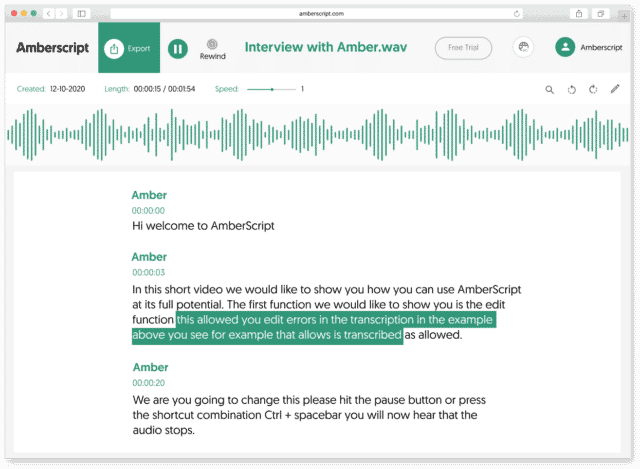
How to automatically generate Japanese subtitles:
1. Upload your video in Japanese Upload your video. Select the number of speakers and the audio language. Sit back and relax while AI generates the subtitles.
2. Edit your subtitle file You’ll receive your subtitle text. Easily make any changes in our cloud-based editor.
3. Export in multiple formats Whatever formats you need, we’ve got you covered. docx., .txt, .srt, .json, .vtt, or EBU.STL
Check out our
Trustpilot reviews
Eccellente
 Basato su 376 recensioni


Le prime impressioni non sono sempre ingannevoli
Trascrizione perfetta e servizio ottimo
Esperienza fantastica
La mia opinione onesta

Il servizio è veloce e buono per essere
Frequently Asked Questions
-
Come posso generare sottotitoli CC?
Puoi creare sottotitoli automaticamente utilizzando Amberscript. Il nostro software ti permette di convertire il tuo file audio in testo ed esportarlo nei formati SRT, EBU-STL o VTT, che sono facilmente inseribili in un video-editor. Ne vuoi sapere di più? Eccouna guida step-by-step su come creare e aggiungere i tuoi sottotitoli.
-
Come aggiungo i sottotitoli ad un video di YouTube?
Per aggiungere i sottotitoli ad un video di YouTube devi semplicemente aggiungere al tuo video il file che hai creato utilizzando Amberscript, nel YouTube Studio. Clicca su “sottotitoli”, poi “aggiungi” e infine “carica un file” e seleziona file SRT.
-
Offrite i servizi in altre lingue?
Sì. Sì. Il nostro software supporta 39 lingue e il nostro network di professionisti madrelingua traduce i sottotitoli in 15 lingue attraverso i servizi di sottotitoli professionali. Puoi richiedere sottotitoli tradotti durante il caricamento del file. Contattaci per richiedere una lingua che non è presente nella nostra lista.
-
Posso incorporare direttamente i sottotitoli nel video?
Se hai esportato la trascrizione in formato SRT, EBU-STL o VTT, puoi facilmente incorporarli utilizzando un software di video editing.
-
Come posso ordinare sottotitoli tradotti?
Carica normalmente il tuo file. Poi seleziona ‘sottotitoli professionali’ per scegliere la lingua in cui tradurre i tuoi sottotitoli. Se non trovi la lingua che cerchi, contattaci attraverso il nostro form.
-
Aggiungete i segnatempo?
Sì, i segnatempo sono inclusi nella trascrizione. Puoi scegliere se esportare la trascrizione con o senza segnatempo.
The benefits of using Automatic Speech Recognition (ASR) to create Japanese subtitles
Automatic Speech Recognition (ASR) takes advantage of the power of voice recognition to generate text from spoken words or audio. Access to online content for people with hearing impairments is made possible through ASR technology. Automated speech recognition simplifies the process of creating subtitles. With ASR, users are able to enter voice or speech data rather than type it. As part of ASR, audio files are used to generate words and text. Subtitle systems are beneficial for people who watch videos. It is possible to automate subtitles, saving hours of labor. In addition to increasing accessibility and engagement, subtitles can improve the quality of digital content. We offer a subtitle generator that automatically creates subtitles from audio files. This method easily generates words that are clear and highly accessible. It is possible to edit subtitles online, highlight specific text, and find specific text relevant to a video. Moreover, subtitles can help native language speakers improve their grammatical, spelling, and punctuation skills. In places like offices, libraries, and public transportation where people can’t hear well, subtitles or captions can help your audience view your videos. Additionally, subtitles can simplify dialogue with foreign accents in addition to streamlining fast-paced, difficult-to-understand languages. Fast, accurate, and user-friendly, the ASR subtitling system is the best in the industry.