Automatically generate subtitles
Autogenerate subtitles in Portuguese
Easily get Portuguese subtitles using our Automatic Speech Recognition (ASR) software. Poruguese is the official language of Portugal. However, only around 5% of people who speak the language actually reside in Portugal. It’s also spoken across many other African and Asian countries such as Brazil, Mozambique, Cape Verde, São Tomé, Macau, and many more. It’s estimated that roughly 300 million people are native speakers of Portuguese, making it the 6th most spoken language globally. The ASR can detect many Portuguese dialects and colloquialisms.
4.3 on Trustpilot

4.5 on Google


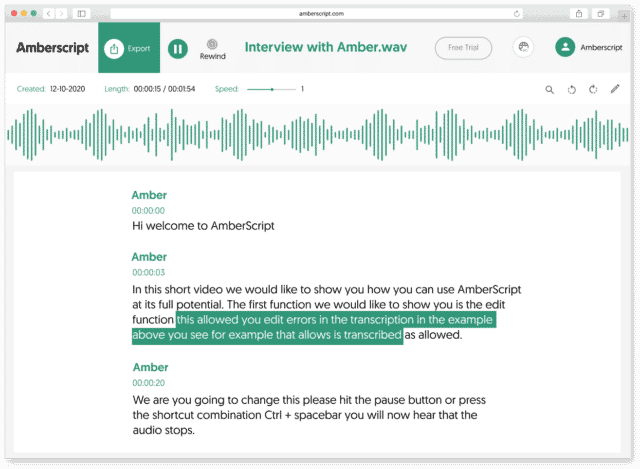
How to automatically generate Portuguese subtitles:
1. Upload your video in PortugueseUpload your video. Select the number of speakers and the audio language. Sit back and relax while AI generates the subtitles.
2. Edit your subtitle fileYou’ll receive your subtitle text. Easily make any changes in our cloud-based editor.
3. Export in multiple formatsWhatever formats you need, we’ve got you covered. docx., .txt, .srt, .json, .vtt, or EBU.STL
Check out our
Trustpilot reviews
Eccellente
 Basato su 376 recensioni


Le prime impressioni non sono sempre ingannevoli
Trascrizione perfetta e servizio ottimo
Esperienza fantastica
La mia opinione onesta

Il servizio è veloce e buono per essere
Frequently Asked Questions
-
Come posso generare sottotitoli CC?
Puoi creare sottotitoli automaticamente utilizzando Amberscript. Il nostro software ti permette di convertire il tuo file audio in testo ed esportarlo nei formati SRT, EBU-STL o VTT, che sono facilmente inseribili in un video-editor. Ne vuoi sapere di più? Eccouna guida step-by-step su come creare e aggiungere i tuoi sottotitoli.
-
Come aggiungo i sottotitoli ad un video di YouTube?
Per aggiungere i sottotitoli ad un video di YouTube devi semplicemente aggiungere al tuo video il file che hai creato utilizzando Amberscript, nel YouTube Studio. Clicca su “sottotitoli”, poi “aggiungi” e infine “carica un file” e seleziona file SRT.
-
Offrite i servizi in altre lingue?
Sì. Sì. Il nostro software supporta 39 lingue e il nostro network di professionisti madrelingua traduce i sottotitoli in 15 lingue attraverso i servizi di sottotitoli professionali. Puoi richiedere sottotitoli tradotti durante il caricamento del file. Contattaci per richiedere una lingua che non è presente nella nostra lista.
-
Posso incorporare direttamente i sottotitoli nel video?
Se hai esportato la trascrizione in formato SRT, EBU-STL o VTT, puoi facilmente incorporarli utilizzando un software di video editing.
-
Come posso ordinare sottotitoli tradotti?
Carica normalmente il tuo file. Poi seleziona ‘sottotitoli professionali’ per scegliere la lingua in cui tradurre i tuoi sottotitoli. Se non trovi la lingua che cerchi, contattaci attraverso il nostro form.
-
Aggiungete i segnatempo?
Sì, i segnatempo sono inclusi nella trascrizione. Puoi scegliere se esportare la trascrizione con o senza segnatempo.
The Benefits of ASR, Subtitles, & Closed Captions (CC)
At Amberscript, we offer businesses and people the option to seamlessly add subtitles and closed captions to their projects, videos, films, and shows through the power of ASR. ASR is short for Automatic Speech Recognition, which is a technological solution for converting spoken language to text without the need of a human.
Subtitles and CC are a critical part of helping viewers understand and comprehend what’s going on the screen. While the standard use is to help those who are deaf or hearing impaired, making your videos more accessible, it’s also a fantastic tool for various other reasons.
With subtitles and CC, people get a clearer picture of what’s being said and that’s extremely helpful in more technical fields with precise jargon or assisting people with understanding someone’s name. Plus, it’s also beneficial to people looking to learn another language so they can follow along and see what’s being said and hear it spoken correctly. And if you’re an international company, converting your audio to text can assist with translation efforts to other languages. Overall, ASR is a powerful tool that brings words to life and makes adding subtitles & closed captions easier than ever.